Field service management software and an app for technicians
Job calendar, route map, signed service reports, job billing.
From the customer's request to getting paid.
14-day free trial · no card required
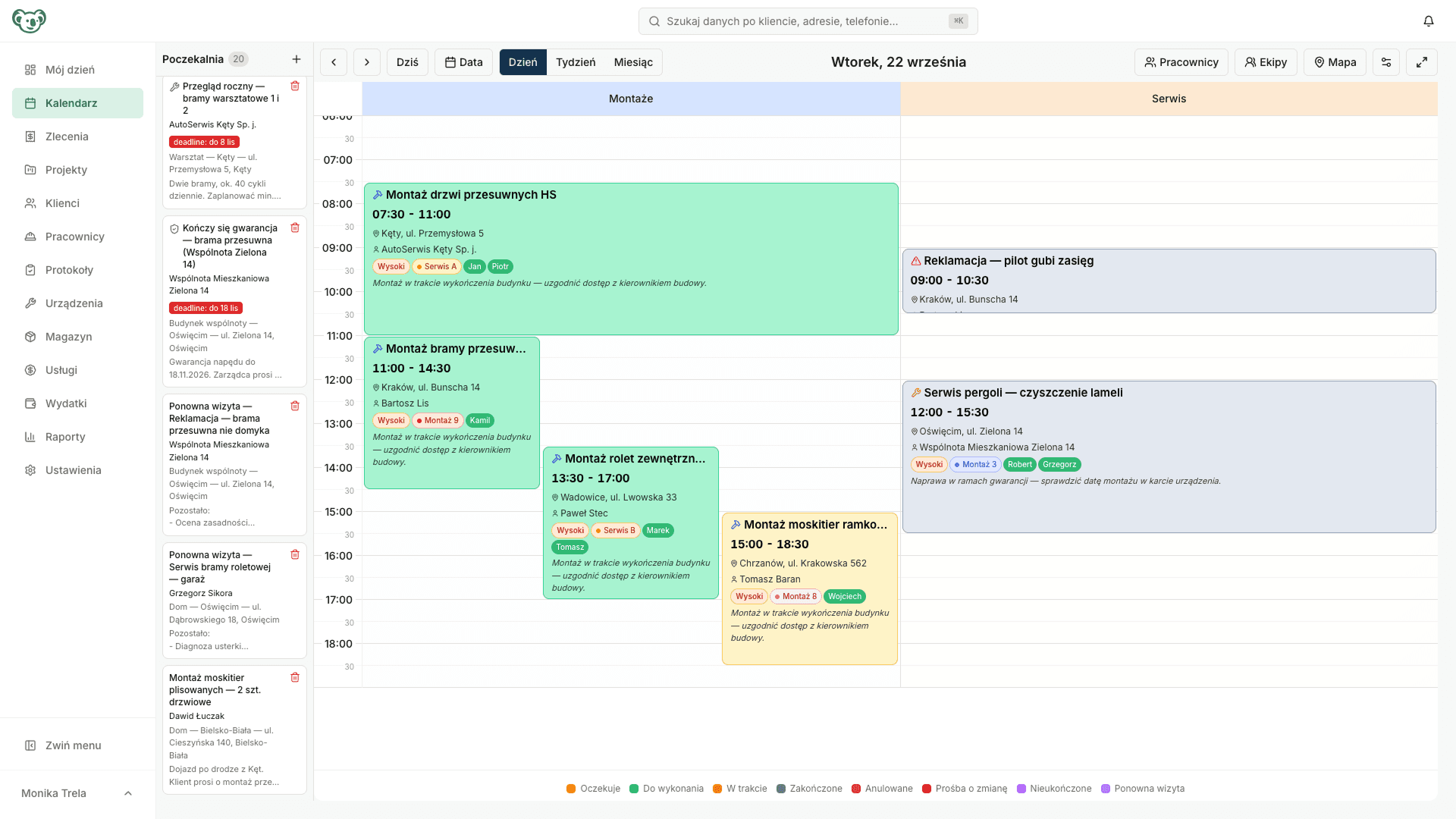
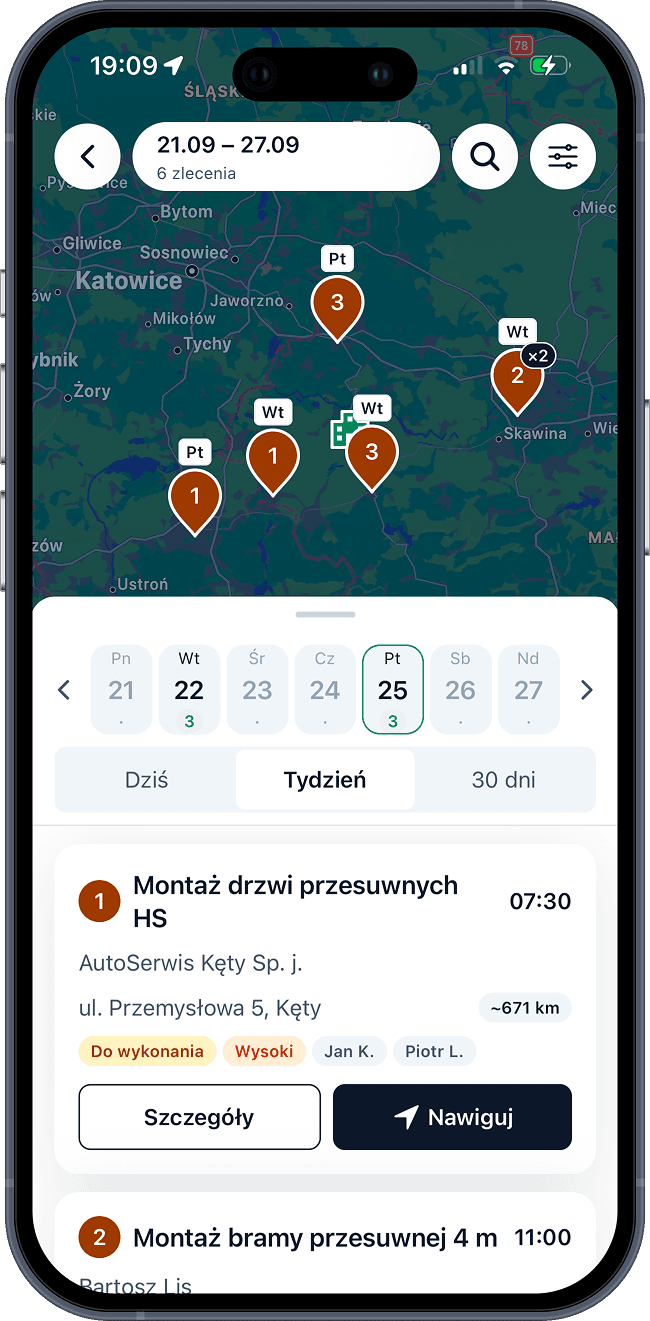
Every job runs through one system, from the first request to billing.
Once several teams are out in the field at the same time, phone calls and spreadsheets stop being enough. ServiceKoala brings order to the whole process without changing the way your business works.
Job
You create a job with a date or leave it unscheduled for later, attach files and assign employees.
Notification
The employee is notified about the new job in the mobile app and sees what needs doing, where and when.
Work on site
The technician records working time on the job, completes a digital service report and can take payment on site.
Service report
Photos and the customer's signature reach the system the moment the work is finished, and the service report goes straight to the customer by email.
Billing
You see which jobs are ready to bill, and billing is built from the job details. If your invoicing or accounting tool has an API, we can connect it.
Reminder
When the next service or maintenance visit is planned, the system reminds you 30 days before it is due.
Missing a process?
We will set it up for your business.
A complete set of tools for businesses
that work at the customer's site.
Customer database
Customers with multiple sites, contact people and their full job history in one record.
Explore the featureJob calendar
Service jobs and the team schedule in one calendar. Every employee knows where to go and when.
Explore the featureService reports
Digital service and completion reports with custom fields, photos and the customer’s signature. The customer receives a link by email.
Explore the featureInstallation projects
Installations that take several visits run as one project: stages, progress calculated from jobs, shared files and templates.
Explore the featureJob map
Jobs and employee routes on a map of the day. The planner shows when a team will be near the customer.
Explore the featureRecurring jobs
Plan planned maintenance and regular servicing once and the whole series of jobs goes into the calendar. Monthly, quarterly or yearly, as you need.
Explore the featureMaintenance reminders
Your own reminders with due dates, plus automatic reminders about asset maintenance and warranty expiry.
Explore the featureSMS notifications
Booking confirmation, “on our way” and a reminder before the visit. You decide what every SMS says.
Explore the featureAssets and maintenance
An asset card with service history, maintenance plans and due dates that remind you on their own.
Explore the featureStock and parts
Product catalogue, stock levels and a record of parts used in one module. Every use is linked to an employee and a job.
Explore the featureJob billing
Billing and payment status for every job in one view, SMS payment reminders and integration with the invoicing tool you already use.
Explore the featureTime tracking
Hours recorded from the field, leave requests, location checks and complete monthly totals.
Explore the featureEmployee portal
The daily plan: jobs, checklists, the customer’s phone number, navigation to the address and a service report created in the field.
Explore the featureService request form
A public page and a widget for your website collect customer requests 24/7. Each request goes straight into the unscheduled jobs list.
Explore the featureReports and analytics
Completed jobs, revenue, costs, working time and pay in one place, with export to Excel.
Explore the featureQuotes
Quotes with your logo, photos and items from your catalogue, sent by email and SMS. You can see when the customer opened them.
Explore the featureAI assistant
Connect ChatGPT or Claude to your jobs, customers and reports. Ask in plain language and the assistant answers from your company data.
Explore the featureBuilt for every business
whose work happens on site.
Frequently asked questions before you start.
How long does it take to set up ServiceKoala?
One working day. We set up your account, move your data and train your team, so the next morning your business is already working in the system.
I use Google Calendar and Excel. Can you move my data across?
Yes. We move your customers, jobs and history from your previous system or spreadsheets. We set up the account and train your team, so you start with all your data in place.
Can you build modules for my business?
Yes. When the standard modules are not enough, we build custom features inside the app. We agree the scope and the price individually after talking through how your business works.
Is there a mobile app for Android and iPhone?
Yes. ServiceKoala has a mobile app for employees on Android and iPhone. Technicians get their daily plan with job addresses and statuses, a route map with navigation to the customer, service reports with photos and the customer's signature captured on the screen, working time recorded straight from site, leave requests and a QR scanner for assets. The same features also work in the phone's browser as the employee portal, so your business does not have to wait for an installation to get started.
How do employees record working time and request leave?
Employees enter their hours in the mobile app, in the ‘My working time’ view, with no calls to the office and no paper timesheets. Weekly and monthly totals update as they go, and every entry has a change history: who changed it, when, and from what to what. Employees submit leave requests from the same screen by choosing the dates and the type of absence, and the administrator approves them in the web app. Approved leave goes straight into the schedule, so nobody books a team on a day when a technician is on leave.
How much does ServiceKoala cost?
The Solo plan for one person costs €30 a month ex VAT. The Team plan starts at €59 a month ex VAT for 3 users, plus €15 for each additional user. Pay yearly and you get 15% off. The first 14 days are free, with no card and no commitment. You will find the details and a price calculator on the Pricing page.
What kind of businesses is ServiceKoala for?
For service and installation businesses whose work happens at the customer's site: HVAC and air conditioning, solar PV, windows, doors and gates, plumbing and heating, electrical contractors, equipment service, bespoke furniture and renovation companies.
What happens when the team has no signal on site?
The employee portal keeps the most recently loaded data, so the daily plan and customer addresses and phone numbers stay visible during a short loss of signal. Saving changes needs an internet connection; the mobile app gives you full offline work with automatic sync.
What about data and security?
Your data is stored on servers in the European Union, encrypted in transit and backed up regularly. Only your business has access to your data.
See ServiceKoala with examples from your industry.
30 minutes online. We will show you how ServiceKoala runs the job process in a business like yours and answer your questions.
14-day free trial · no card required