Quotes for service and installation businesses
Quote software for the trades: build a quote with your logo, photos of past work and items from your own catalogue, send it by email and SMS and see when the customer opened it.
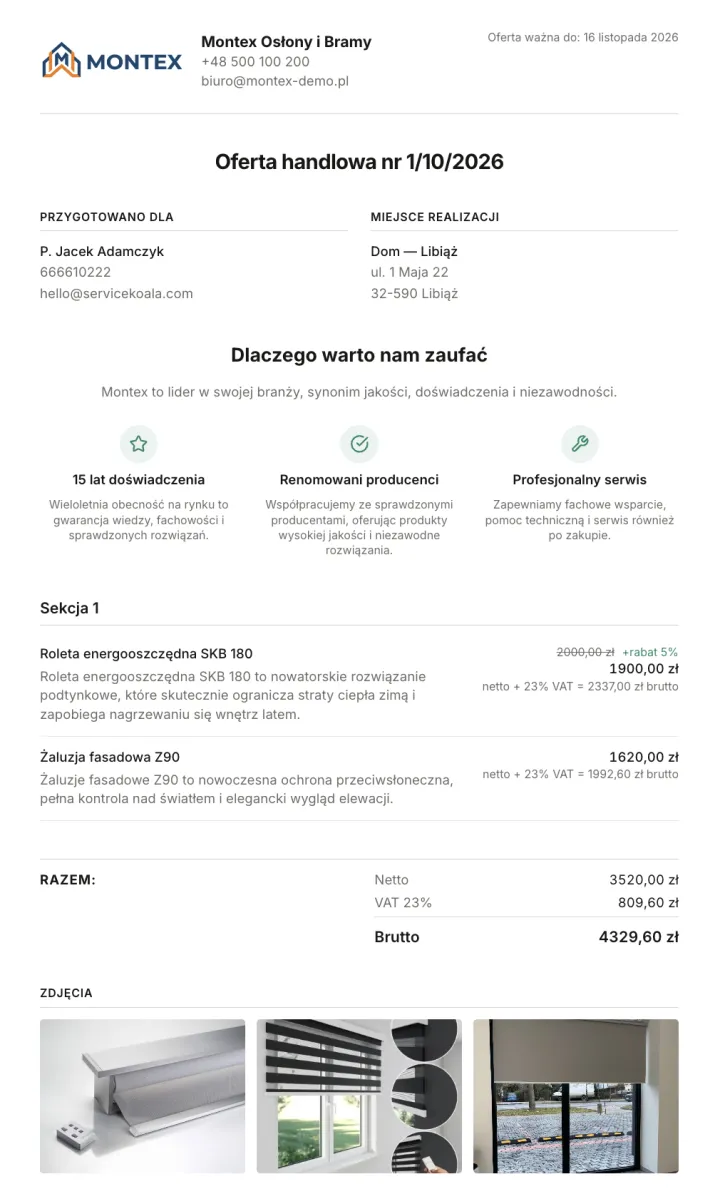
ServiceKoala is quote software for service and installation businesses. You build a quote from services in your price list and products in your catalogue, then add photos of past work and terms from templates. The quote carries your company's logo and details. You send it straight from the system by email, and a link to the quote by SMS as well. When the customer opens the quote, you see the status "Viewed" with the date and time.
Quote software for the service trade
Sent by email straight from the system
The customer gets an email with your message and a "View quote" button. You write the text once as a template and use it for every quote.
Quote link by SMS
Along with the email you can send an SMS with a short link to the quote, so the customer can open it on their phone straight away.
SMS notificationsKnow when the customer viewed the quote
When the customer opens the quote, the list shows the status "Viewed" with the date and time. You call at the right moment.
Quotes with your branding
Your logo and company details, a "Why us?" section with your strengths, a contact for your specialist and a link to your Google reviews.
Photos of past work in the quote
Add photos of completed work from your company portfolio to the quote. The customer sees what the result looks like before they decide.
Quotes built from your products and services
Pick line items from your price list and product catalogue, with prices and VAT rates. You can also add an item by hand.
Stock and partsOptions, extras and discounts
Split the quote into sections and add optional extras, surcharges, discounts and free items. You can show the customer just the section totals.
Terms and ready-made templates
Validity, payment terms and warranty terms are filled in from templates, so you do not retype them for every quote.
From sending to completion
Quote status, contact status (for example "Call back later") and a note from the call. You mark a quote as accepted, and once the work is done, as completed.
What do you gain by sending quotes from ServiceKoala?
The quote goes out the same day
Catalogue items, terms from templates and a ready-made email: preparing a quote takes a few minutes, not an evening in a word processor.
The customer sees a professional business
A quote with your logo, photos of past work and Google reviews looks better than a table in an attachment and is easier to compare with competitors.
You know when to call
The "Viewed" status tells you the customer has already read the quote, so you can call while it is still fresh in their mind.
No quote gets lost
All quotes are in one list with their status and notes, so you know which are waiting for an answer and which have come back accepted.
Frequently asked questions about quotes in ServiceKoala.
Can I prepare a quote for a customer in ServiceKoala?
Yes. You prepare the quote in the quotes module: pick services from your price list and products from your catalogue, add discounts, optional extras and terms, then send the finished quote to the customer by email and SMS.
How do I send a quote to a customer from ServiceKoala?
You send the quote straight from the system: the customer gets an email with a "View quote" button and, if you tick the option, an SMS with a short link as well. The quote opens in the browser on a computer or a phone.
How do I know the customer has viewed the quote?
When the customer opens the link, the quote gets the status "Viewed", and the list of quotes shows the date and time it was viewed.
Does the quote show my company's logo and details?
Yes. The quote shows your company logo and contact details, and in the settings you can add a section with your strengths, a contact for your specialist and a link to your Google reviews.
Can I add photos to a quote?
Yes. For each quote you choose up to 16 photos from your portfolio of past work, which you build once in the settings.
Do I pick quote items from a catalogue?
Yes. You pick services from your price list and products from your stock catalogue, with prices and VAT rates. You can add an item that is not in the catalogue by hand.
Does the customer need an account to see the quote?
No. The customer opens the quote from the link in the email or SMS, without signing in or installing an app.
See ServiceKoala with examples from your industry.
30 minutes online. We will show you how ServiceKoala runs the job process in a business like yours and answer your questions.
14-day free trial · no card required