Multi-stage installation projects
Run an installation spread over several visits as one project. Each stage has its own jobs in the calendar, and files uploaded to the project are available in every job in that project.
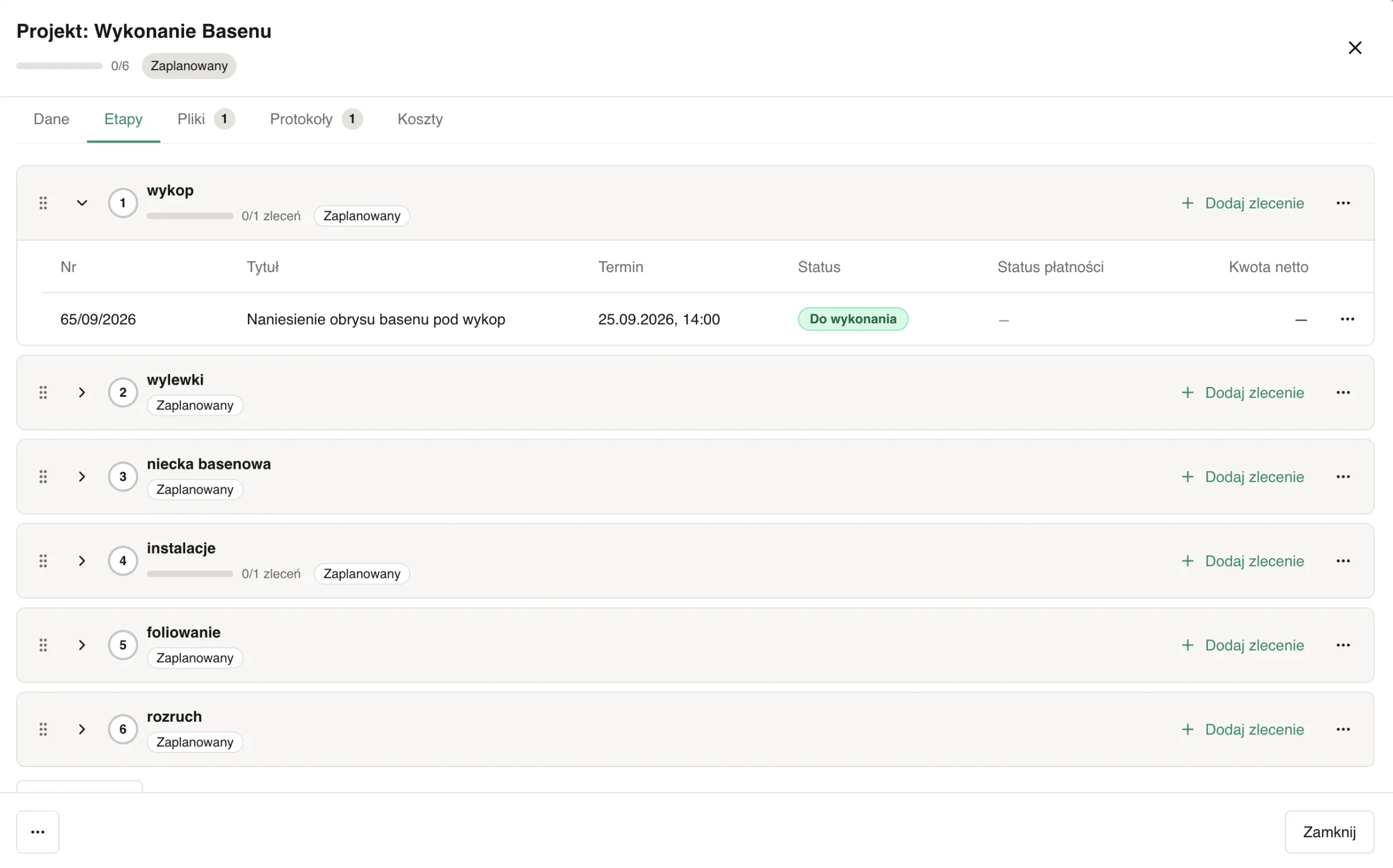
ServiceKoala is installation management software for installation and service businesses, where work spread over several visits runs as a multi-stage project. A project has a customer, a site, a description, a deadline and optional stages, such as survey, installation and commissioning. Each visit is a separate job in the calendar, linked to a stage, with its own date and team. The project status and progress are worked out from the job statuses: you can see which projects are in progress, which are unfinished and which are past their deadline. A new job takes the customer and address from the project, and project files are visible in every job, including in the mobile app. You create repeat installations from a template with ready-made stages and jobs.
Features for managing installation projects
ServiceKoala is installation management software where a project ties together all the visits to one customer. You see the stages, progress, deadline and documents for the whole installation.
Project stages
You split an installation into stages, such as survey, installation and commissioning. You can change the order of stages at any time.
Many jobs in one stage
A stage covers as many visits as the work needs. Each visit is a separate job with its own date and team.
Status worked out from jobs
The project status changes by itself together with its jobs: scheduled, in progress, unfinished or completed.
Project progress
The project list shows how many stages are completed. Each stage shows the number of jobs done.
Next job
Each project shows the date of the next visit, or tells you that a job is waiting for a date.
Job calendarCustomer and address entered once
A new job in the project gets the customer and site automatically. The type, assigned employees and duration are suggested from the previous visit.
Customer databaseShared project files
You add a technical drawing, a contract or photos once. The files are visible in every job in the project, including in the mobile app.
Technician appService reports for the whole installation
Handover reports from all the jobs in the project are gathered in one place.
Service reportsProject templates
You save a repeat installation as a template with stages and jobs. You set up the next project from a ready plan.
Search and archive
Find a project by name or customer. You archive completed installations and restore them if needed.
Project costs and profit
In the web app, with the Costs module turned on, you compare project costs with the value of its jobs.
Reports and analyticsInstallation project templates for repeat work
You set up similar installations from a ready plan of stages and jobs.
Saved from a finished project
The template remembers the stages and jobs: title, type, duration, checklist and services.
Works for any customer
The template does not carry over dates, the customer or assigned employees, so it fits every new installation.
Jobs straight into unscheduled
A new project from a template can create its jobs straight away, and they wait for a date in the unscheduled list.
How to run an installation project in stages, step by step
- 01
You set up the project
You choose the customer and site and enter a description and a deadline. You can start from a template.
- 02
You split it into stages
You enter the installation stages in order, such as survey, frame installation and commissioning.
- 03
You add jobs to the stages
The customer and address come from the project. A job without a date waits in the unscheduled list.
- 04
You schedule visits in the calendar
The installation schedule takes shape in the team calendar: you give each job a team and a date. The employee gets the job with the project files in the mobile app.
- 05
Handover and billing
The employee collects the customer's signature on the service report, and you bill the job. Once the last job is done, the project is marked as completed.
Projects in ServiceKoala vs Excel and Google Calendar
A spreadsheet listing your installations works for a few at a time. With a dozen or more running at once, you need a project that shows its own status and progress.
| Feature | ServiceKoala | Excel | Google Calendar |
|---|---|---|---|
| Project with customer, site, description and deadline | by hand in a spreadsheet | — | |
| Stages with assigned jobs | by hand in a spreadsheet | — | |
| Status and progress worked out from jobs | by hand, with formulas | — | |
| Projects past their deadline flagged | conditional formatting | — | |
| Project visits in the team calendar | — | not linked to a project | |
| Project files in every job on the phone | — | attachment to an event | |
| Service reports for the project's jobs in one place | — | — | |
| Templates for repeat projects | copy of a spreadsheet | — |
For a full comparison, see Why ServiceKoala. Prices are on the pricing page.
How do you track installation stages for many customers at once?
Nobody knows which installation has stalled
With a dozen installations running at once, you have to check the state of each one with the teams, and the spreadsheet soon goes out of date.
In ServiceKoala: The project list shows the status, stage progress and next job for every installation.
An unfinished installation looks closed
A missing part pushes a visit back, but the summary still shows the installation as done.
In ServiceKoala: An unfinished job marks the whole project as unfinished, so you can see the installation needs another visit.
The same details typed in for every visit
Repeating the customer, address and scope of work in every job is a common source of mistakes.
In ServiceKoala: The customer and site come from the project, and the project description is visible in every job in the web app.
Documents scattered across messages
Drawings and the contract go back and forth between phones, and the team does not always have the latest version.
In ServiceKoala: You add project files once, and the team sees them in every job in the mobile app.
Which installation businesses are multi-stage projects for?
Projects are for businesses that carry out installations over several visits to the same customer.
Solar PV and renewables
Site assessment, frame installation, panel installation and commissioning as stages of one project.
See the industryHVAC and air conditioning
Installation in a building floor by floor or zone by zone, with separate visits for each stage.
See the industryWindows, doors and gates
Survey, ordering and installation for one customer run as one project.
See the industryBespoke furniture
Survey, fitting and adjustments, with the technical drawing available in every job.
See the industryRenovation companies
A renovation in stages with a deadline for the whole job and service reports from every visit.
See the industryElectrical contractors
Electrical work on a building site in stages: first fix, second fix and handover.
See the industryFrequently asked questions about ServiceKoala multi-stage projects.
Projects and stages
What is installation project management in ServiceKoala?
Installation project management means running work for one customer that is spread over several visits as a single multi-stage project. In ServiceKoala a project has a customer, a site, a description, a deadline and stages, such as survey, installation and commissioning. Each visit is a separate job in the calendar, and the project status and progress come from the state of those jobs.
How is a project different from a single job?
A job is one visit with a date, a team, services and a service report. A project ties together many jobs for the same customer at the same address, splits them into stages and shows the progress of the whole installation. You run repairs and maintenance as ordinary jobs, without a project.
Does a project have to have stages?
No. Stages are optional: a project can simply group jobs, and progress is then worked out from the jobs done. You add, change and reorder stages at any time. The jobs of a deleted stage stay in the project as jobs without a stage.
How is the project status set?
The status is worked out from the job statuses. A project where no work has started is scheduled, one with jobs under way is in progress, one with an unfinished job is unfinished, and once all jobs are done it is completed. The only thing you set by hand is archiving.
Scheduling and teams
Can different teams carry out different stages of one project?
Yes. You assign a team and a date to each job, so one employee can do the survey and a whole crew the installation. A new job suggests the type, assigned employees and duration from the previous job in the project.
How do project jobs show in the calendar?
Project jobs are in the team calendar alongside all your other jobs. The tile shows the project name and stage number, and in the unscheduled list jobs without a date are grouped by project.
Does ServiceKoala have a Gantt chart?
No. You see the installation schedule in the team calendar, and project progress on the project list and on each stage. You set a deadline for the whole project and visit dates in the jobs.
How can I quickly set up another similar project?
Save a finished project as a template. The template remembers the stages and jobs with their type, duration, checklist and services, without dates or the customer. A new project from the template can create its jobs straight away in the unscheduled list.
Employees and documents
What does an employee see in the mobile app?
An employee sees their own project jobs with the address, services and project files, such as a technical drawing or a contract. The project list, stages and progress are visible to admins in the mobile app.
Where are the handover reports for the whole project?
Each job has its own service report signed by the customer. The project gathers the service reports of all its jobs in one place, so the documents for the whole installation are in one project.
Costs and onboarding
Can I work out the profit on a project?
Yes, in the web app with the Costs module turned on. You enter the contract value for the project and assign costs to it, and revenue is the total of its jobs ex VAT. You see the project's profit and margin.
Will you move my data from Excel or another program?
Yes. During onboarding we move your customers from a notebook, Excel or another program, along with jobs and the history of service reports. From then on you run new installations as projects in ServiceKoala.
How much do multi-stage projects cost?
Projects are included in the ServiceKoala subscription at no extra cost. You turn the module on in the settings, and you can try the whole system free for 14 days, no card required.
See ServiceKoala with examples from your industry.
30 minutes online. We will show you how ServiceKoala runs the job process in a business like yours and answer your questions.
14-day free trial · no card required