Customers, sites and assets in one record
Every customer has one record in ServiceKoala: sites with contact people, jobs, photos and files, together with the details you need for billing.
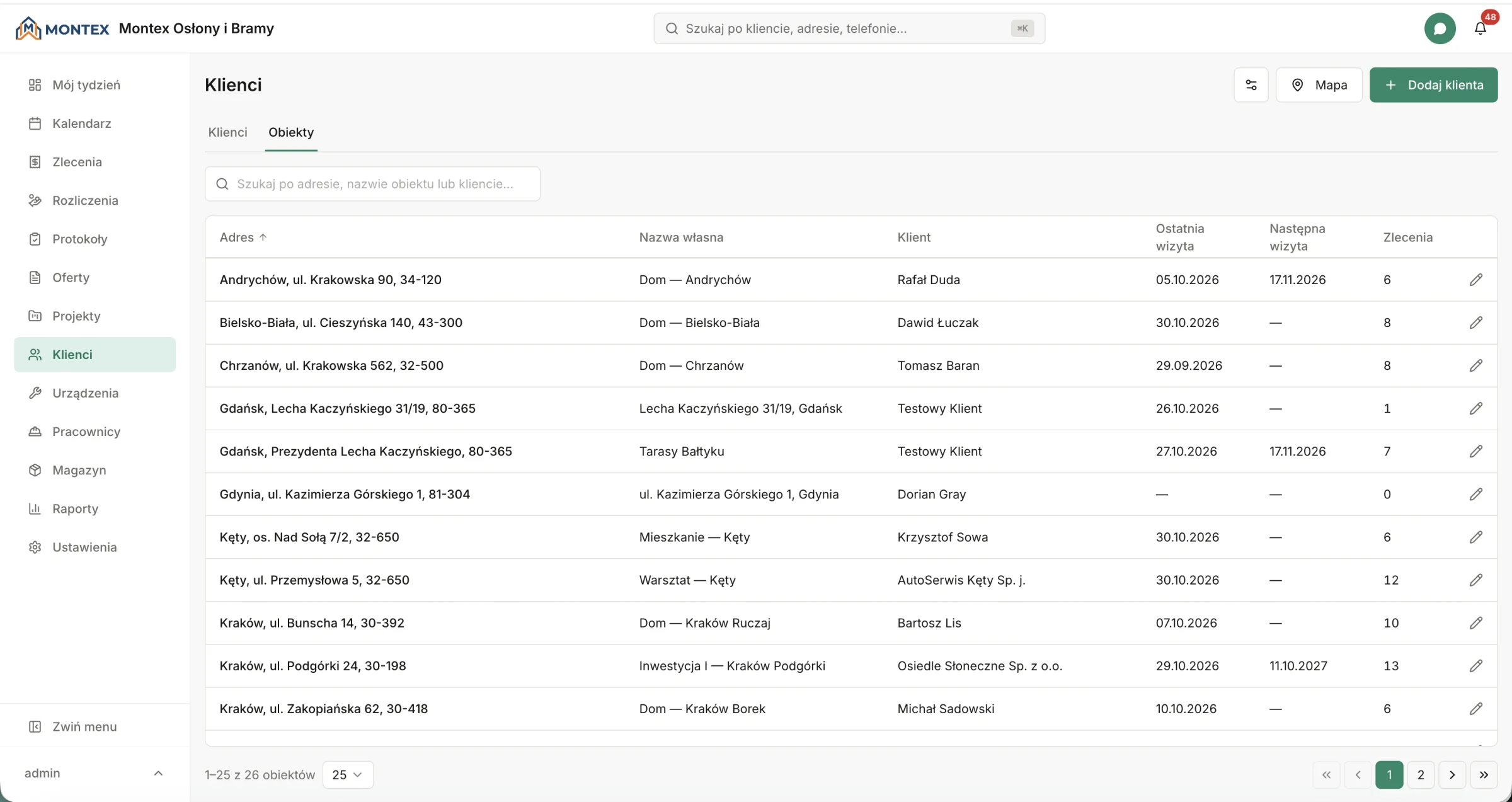
The customer database in ServiceKoala is the record of businesses and private customers that a service or installation company carries out jobs for. Each customer can have many sites, and each site has contact people, notes for the technician, photos and assets. The customer record brings together the job history and the photos from service reports, along with the company name, address and VAT number for billing. The system warns you before you add a customer with a phone number that is already in the database. Sites have a location on the map, and you filter the map by category and by services carried out.
What the customer database holds in ServiceKoala
The customer database of a service business connects each customer with their sites, jobs and photos from visits.
Many sites for one customer
A customer's home, office, workshop and warehouse are separate sites, each with its own address.
Contact people on site
You can save several people for a site, with their role, phone number and email, such as the site manager and reception.
Service sites on the map
Every site has a pin on the site map. You filter the map by customer category and by a service that was or was not carried out.
Job mapYour own customer categories
You split customers into groups, such as service contract, developer or private customer. A customer can have several categories.
Search by customer details and address
Find a customer by name, company, phone number, email or VAT number.
Customer assets
With the Assets module turned on, the customer record shows the serial number, warranty and next maintenance date.
Asset managementCustomer service history
All of a customer's jobs are in one table, filtered by site and status. Each one shows who did the work and the amount ex VAT.
Job calendarPhotos and files in one place
Photos from the site, jobs and service reports are on the customer record. You filter them by site and by source.
Service reportsCustomer database in the mobile app
Admins and managers have customer records on their phones. Photos and videos from a site can be saved even without signal.
Mobile appCustomer and asset database: customer, site, asset
Jobs, service reports and photos are linked to a specific site. In a job you can see earlier visits to that address.
Customer
A business or private customer with billing details, categories and notes.
Site
The place where the work is done: an address with a map location, contact people, notes for the technician, photos and files.
Asset
A unit installed at the site with a serial number, warranty, maintenance date and service history.
Asset managementCustomer database in ServiceKoala, Excel and a notebook
A spreadsheet and the contacts on your phone are enough for a dozen customers. With many sites and regular maintenance, you need a customer record linked to your jobs.
| Feature | ServiceKoala | Excel | Notebook or phone contacts |
|---|---|---|---|
| Many sites for one customer with contact people | by hand in a spreadsheet | — | |
| Warning about a duplicate phone number | — | partly | |
| History of jobs, service reports and photos on the customer | by hand, no photos | — | |
| Assets with warranty and maintenance date | Assets module | by hand in a spreadsheet | — |
| Map of sites with a filter for services carried out | — | — | |
| Contact details hidden from employees | — | — | |
| Access on your phone | mobile app |
For a full comparison with spreadsheets, see Why ServiceKoala. Prices are on the pricing page.
Customer database problems in a service business
The technician drives to the wrong address
The customer has several locations, but the job only has the company name.
In ServiceKoala: The job is linked to a specific site with an address, a pin on the map and a contact person on site.
The same customer in the database several times
Everyone in the office enters customers their own way, and the job history ends up split across several records.
In ServiceKoala: A phone number belongs to one customer. When someone tries to add a duplicate, the system shows the existing record.
Customer history in several places
Service reports are in an email inbox, and photos are on employees' phones.
In ServiceKoala: Jobs, service reports, photos and files are on one customer record.
Customers who have not had maintenance for a long time
In a spreadsheet it is hard to find the customers whose maintenance has not been done yet.
In ServiceKoala: The map shows customers where a chosen service has not been carried out, and the site table shows the date of the last and next visit.
A customer and site database for your industry
The ServiceKoala customer database is for businesses that serve customers at many addresses and go back to them for maintenance, repairs and installations.
HVAC and air conditioning
A customer's air conditioning units across several buildings, with a serial number and maintenance date for each asset.
See the industryFacility management
Many sites for one client, each with a site manager and people on site.
See the industrySolar PV and renewables
Customer installations with a location on the map and a history of warranty maintenance.
See the industryMachine and equipment service
Machines assigned to the customer's halls and plants, with warranty and service history.
See the industryWindows, doors and gates
Surveys, installations and service at the same address, with photos from every visit.
See the industrySecurity systems
Customer sites with contact people and notes for the technician on how to get into the building.
See the industryFrequently asked questions about the ServiceKoala customer database.
The basics
What is a service customer database?
A service customer database is the record of a service or installation company's customers, where each customer has their sites, assets and job history. In ServiceKoala the customer record holds billing details, sites with contact people, jobs and photos, and with the Assets module turned on, assets with their maintenance dates. The office and the technicians work from the same, up-to-date data.
What is the difference between a customer, a site and an asset in ServiceKoala?
A customer is the business or person who orders the work and is billed for it. A site is the specific place where the work is done, such as a house, an office or a workshop, with its own address and contact people. An asset is a unit installed at the site, with a serial number, warranty and maintenance date.
Can one customer have several service addresses?
Yes. A customer can have any number of sites, and you mark one of them as the default. Each site has its own contact people, notes for the technician, photos and job history.
How is the ServiceKoala customer database different from a CRM?
A CRM focuses on sales and the deal pipeline. The customer database in ServiceKoala is connected to work in the field: the job calendar, service reports signed by the customer, assets and job billing. You prepare a quote for the customer in the quotes module.
Adding and organising data
Can I store billing details for business and private customers?
Yes. The customer record holds the company name, billing address and VAT number for a business customer. You can save billing details for a private customer too.
What happens if I add a customer who is already in the database?
When you enter a phone number, the system checks whether another customer already has it and shows their details with an option to open the record. The same phone number cannot belong to two customers.
Can I split customers into groups?
Yes. You create your own categories, such as service contract, developer or private customer, and a customer can have several categories. You filter the customer list and the map by category.
How do I move my customer database from Excel to ServiceKoala?
We move it for you during onboarding. We bring your customers from a notebook, Excel or another program into the system, together with jobs and the history of service reports. New customers then come into the database from the service request form, from the office or from a technician in the mobile app.
Working in the field
Can a technician see customer details in the mobile app?
Yes. In the job the technician has the site address, the customer contact, their own earlier visits to that address and photos of the site. Admins and managers have the full customer database in the mobile app.
Can I hide the customer's phone number and email from employees?
Yes. In the role settings you turn off the visibility of customer contact details in the employee's jobs and service reports. The site address and the scope of work stay visible.
Can a technician add a new customer in the field?
Yes. An employee can add a customer and a site in the mobile app from a job or a service report, even without signal. Editing and deleting customers stays with the office.
Data security
Can a customer be deleted by accident?
Deleting a customer needs confirmation. A customer with billing records, projects or service reports cannot be deleted. Neither can a site with assets, service reports or projects.
Do I need the customer's marketing consent to send an SMS with the visit date?
An SMS or email with the visit date or a reminder is service communication about a job the customer has booked, not marketing. It tells the customer when the technician is coming and nothing more.
Can I download my customer database from ServiceKoala?
Yes. In the settings you download a copy of your company data as a ZIP archive with an Excel file and CSV files. Customers and addresses are in separate sheets, next to jobs, service reports and assets.
Bring your customer database to ServiceKoala.
During onboarding we move your customers from a notebook, Excel or another program, along with jobs and the history of service reports.
14-day free trial · no card required